Any map that focuses on guiding you along tails and small ways will not route over long distances on you GPS. While Nuvis, and possibly Oregon/Colorado have some more processing power and due to reasonable screen size make it possible to plan routes on the GPS directly to some extent, Vista HCx / Legend HCx or edge 705 users will usually plan their routes in mapsource or using Top 50 maps.
As the Autorouting of the openmtbmap and VeloMap in Garmin Basecamp usually works very well, but once you send long routes without via-points to your GPS the GPS cannot recalculate the route you either have to insert additional via points, which is directly in Mapsource not the easiest thing or you can use WinGDB https://www.sackman.javawa.nl/ not online anymore - This is a backup installer that I still had saved.) to insert additional via-points to your route. This guide was still written with Mapsource - for Basecamp please just watch the video tutorial. Of course WinGDB is still usable, but much less important than many years ago - Basecamp and modern Garmin GPS devices route very similar.
General Video Tutorial for planning routes and tracks in Basecamp:
Contents
Setting Up Mapsource:
I usually set Mapsource to use Car/Motorcycle – Shorter Distance – Prefer Highways slider to the right (this is found under tools à Preferences à Routing)
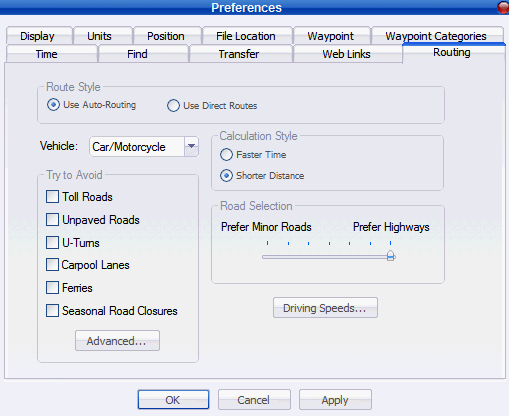
In case you plan a cycle route and want to avoid difficult tracks and trails check “Toll Roads” in the “Try to Avoid” panel.
If you wan’t to have more accurate time information go to advanced and set the following speeds:
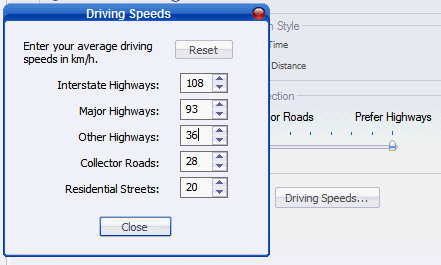
Note that I only divided the lower three values by two. Changing Interstate Highways or major Highways speed value does not matter.
You can play around changing to other speeds, but the more you change here, the greater will be the difference on your GPS in terms of how it recalculates the routes as you can’t set these speeds on your GPS itself. Therefore I would advise simply dividing these values by a factor (i.e. 2).
Now click on close, and in the Routing window click on Apply.
The actual root planning:
- Plan your route in Mapsource, To do that click on the route tool (the tool in the middle):

And click at each point you want to go to.
- Go to File à Save as and save the route as gdb file (the default filetype)
- Open Wingdb (0.43 or later - download it here: https://www.sackman.javawa.nl/ ), open the saved route and use option "5. Add extra via points to routes”. You can set in preferences the average distance between via points that should be used. The lower the distance the closer your GPS will stick to the route calculated. I usually set 5km for routes that go through cities, or up to 9km for cycle routes alongside national/international cycle routes like the “Donauradwanderweg”.
You can either save the output or reopen it in a new Mapsource window ( on Output Mapsource is checked), which is what we do here now. To start WinGDB click on "Convert". Please note as of WinGDB Version 3.50 Option 5 is found under Route Conversions with number 15.

- Back in Mapsource, Right click on the route and recalculate it. Now I usually set Mapsource Preferences to “faster route” and leave the slider in the middle. This way route recalculation will be more or less the same as in Mapsource. I use the additional 1. step of calculating the route with “shorter route” and “prefer highways” so that the route is rather straight. If you don’t mind some detours you could both times use “faster distance”.
- Now click on Transfer à Send to device and send the route to the GPS. Attention Mapsource will also send routes to an external cardreader, but you can’t reopen them. Therefore contrary to sending cards, you have to connect the PGS via USB to your computer. Note that most units have a maximum of 20 routes that they can save, and the filename for a route is maximum 12 or 14 characters long. If there are more routes old routes may be overwritten, if the route name does not differ in the first 12 characters, the same will happen.
Attention: Recalculation of a route on GPS can only work if the same map that is used to generate the route in Mapsource, also is activated on the GPS itself. If this is not the case either transfer it, or use tracks instead of routes. You can use WinGDB to make tracks out of routes (see below).
Additional Tipps:
Type of Way, way attributes
To see on what kind of streets a route is calculated, double click the route and click on the “directions” tab. Here you can see the names of the streets/routes and as suffix the type of road. Also additional info like xbk (no bicycles allowed) or bkrt (bicycle route) give further info about the type of ways.
Tracks instead of Routes
If you don't have the VeloMap installed on your GPS, you can still profit from routes calculated with Mapsource, by using WinGDB to convert Tracks into routes.
Also If you need more than 20 routes on your GPS, or you prefer to work with tracks in general, or you have non Garmin GPS, you can use WinGDB to create a track from the route. Tracks are overlayed on you GPS over the map (whereas routes are shown below a street), and guide you in straight lines between each point.
Whereas routes only offer 50 viapoints (on most outdoor units, Some GPS may have higher limits), tracks can have 500 or more points per track depending on the GPS you want to use the track with. Which of the options 11-14 best suits your needs is explained in the WinGDB helpfile.


Leave a Reply
You must be logged in to post a comment.