Contents
- 1 About the Autorouting
- 2 Usage Instructions - For All Programs / GPS.
- 3 Old Generation (Mapsource, Garmin GPS without Activity Routing Support)
- 4 Mid Generation (Basecamp 3.3 - 4.5 or older Garmin GPS with first version of Activity Routing Support)
- 5 New Generation - 2016 onwards - Basecamp 4.6 or newer:
- 6 Faster Time vs Shorter Distance
- 7 Road Type Avoidances
- 8 Feature Type Avoidances:
- 9 General Tips and Advices - e.g. Route Calculation Fails
About the Autorouting
The maps offered here are to be used for recreational / touristic cycling and/or roadbiking. There is a general preference to route you small streets and cycleways. Streets have lower priority. However note that the GPS will not take huge detours on trails to avoid a primary or secondary highway - even though they have the lowest priority. Autorouting with my maps is unusable with a motorcar. Use another Openstreetmap implementation instead if you intend to use your car.
Please note, the instructions below are only valid for Velomap - other maps might behave differently. Also note, never have to different maps, which both offer Autorouting, enabled on your GPS device. In that case routing results will be erroneus or bogus (or failing). As the format of Garmins new maps with Activity Routing is not known, I have tweaked the maps to give similar or better results, by tricking the maps in such a way, that cycle routes are like interstate highways, while primary or secondary big roads are residential roads for the routing software. Therefore read carefully (actually the results you can achieve with my maps, are far superior for cycling, compared to any Garmin map as of 2012 (and Velomaps offer routing for bicycle since 2009, so long before Garmin copied it)).
Usage Instructions - For All Programs / GPS.
Note that all may behave different. In principle we have the following classes:
Old Generation - Mapsource, Basecamp v1 & v2 & v3.1, v3.2, All Garmin GPS WITHOUT Activity Routing (etrex vista/legend hcx or older, edge 705, GPS Maps 60 series; AND Dakota, first generation Oregon, Montana,GPSMaps 62 series with older Firmwares )
Old Generation (Mapsource, Garmin GPS without Activity Routing Support)
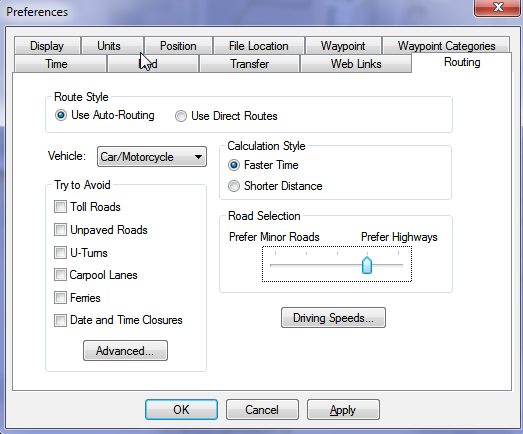
For the Old Generation, there is still one Distinction. In Mapsource under options/autorouting you have a slider to prefer small roads (left side) to highways (right side). If you move this slider to the right hand side, better suited ways/streets will be preferred but route calculation over long distance may fail. On the GPS such a setting does not exist, but the GPS is anyhow more strict on choosing well suited roads. On the other hand the "route calculation method" is only available on the GPS.
Transport Modes
Car/Motorcycle = Works well on shorter distances - might produce long detours. Routes over All Roads and Ways exactly like Bicycle.
Taxi = avoids under most circumstances footways; steps, pedestrian ways, living streets or streets with unknown surface/tracktype. To avoid unpaved ways, you still need to select to avoid them. Besides it routes identical to car/motorcycle
Bus / Truck = Avoids turning. Hence don't use it.
Pedestrian No good autorouting over longer distances, will usually give quite direct vias - does not respect oneways.
Bicycle = Works well in combination with "shorter distance". Is good for calculating longer distances on you GPS if you get "out of memory" errors. Routes over All Roads and Ways exactly like Car/Motorcycle.
Only For Mapsource
Note the slider called "Road Selection". The more towards the right (prefer highways) you push it, the more you will be routed over Cycleroutes and Cycleways. Never move it to the left. If you feel that cycleroutes are favored too much, better use transport mode: bicycle, or use "shorter distance".
NEVER Tick "Avoid Highways" - It will block the best ways. On my maps, shared use pathes and cycleways are encoded for the GPS as highways. Real highways or big streets where cycling is not allowed are not routable anyhow with the Velomaps (so no need to avoid them).
Route Calculation Method: Per default I would advise to use "quick". However if you get "out of memory" errors, go for "better route". On best route calculation is able to get you to pretty remote places, however you might need to wait up to 10 minutes or longer until the calculation is actually finished.
Route Calculation Percentage value - The indicator has a bug on all units. It is only correct if jumping by several percent. However if it only increases by one percent per second, then it will reach 100% long before it has calculated the route. Hence when it gets stuck at 100%, there is still a good chance that the route can actually be calculated correctly. Using "better route" or "best route" for route calculation method, this often means waiting 3-5 minutes until the route is actually calculated.
So what of the above makes sense?
For roadbiking: Use "Bicycle" as transport mode, tick "avoid toll roads", tick "avoid unpaved roads", and use shorter distance/faster time to your liking. Maybe if you don't mind very few times to cycle on gravel, then don't activate "avoid unpaved roads" - they won't be frequent.
for commuting: Use "Bicycle", shorter distance, and don't tick any avoidances
for recreational cycling / trekking / touring: Use Car/Motorcycle, Faster Time, and tick "avoid toll roads".
-- As the map data in Openstreetmap is everywhere different, and also the offer of good ways/routes for cycling differs a lot, just try around a bit in Mapsource, to find out what happens. In General Mapsource and your GPS will route similar over short distances.
Mid Generation - Basecamp v3.3 to v4.5. Dakota, Oregon 600/650, Montana, GPSMaps 62 series with newest Firmware, 64 with older firmwares, edge 520/820 with older firmwares
Mid Generation (Basecamp 3.3 - 4.5 or older Garmin GPS with first version of Activity Routing Support)
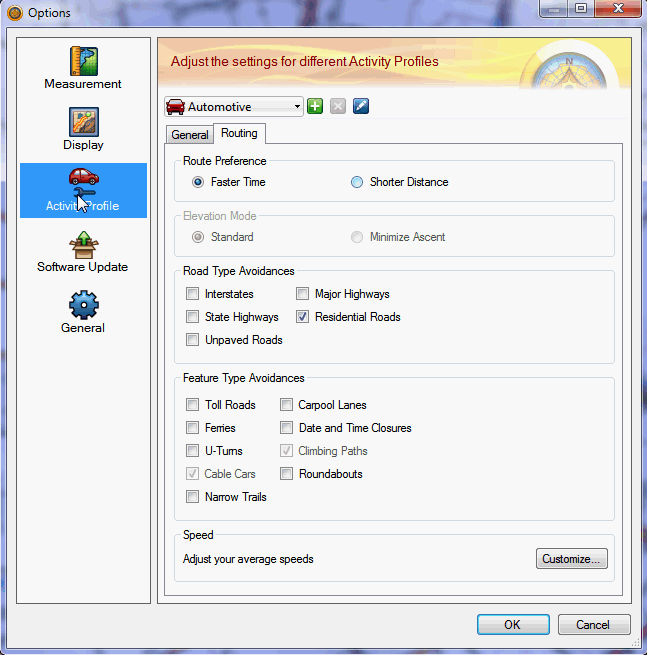
Basecamp v3.3 to 4.5, behaves quite differently to previous versions, or Mapsource, and also on the internal side of how it checks the maps, and what it does is very different. So Let's have a look on what you can set. In Principle (except for etrex 10/20/30) the GPS devices behave very similar to Basecamp v4.
In the top left, you can set the Profile. Currently Automotive is activated.
Automotive and Motorcycling have been the method of choice for Basecamp v3 and Mapsource - but are not really usable except for short distances with VeloMaps in Basecamp v4 and newer anymore! On etrex and 62s series - where you cannot choose ATV as routing mode - use car or bicycle.
Then there are several Bicycling, Mountainbiking, Group Cycling (and maybe more in future) options. With the VeloMap - if you configure the avoidances the same, they all route alike. These modes are okay, if you don't mind to find yourself quite often on asphalt and streets. They do tend to often use bigger streets with newer firmwares though or in Basecamp v4.
ATV and Dirt Biking Route pretty similar - Dirt Biking gives the best routes and can route over very long distances (>100km by air without any intermediary routing points). However Dirt Biking is not available on most GPS devices - while ATV is (e.g. on most Oregon/Montana and maybe Dakota/64s?).
Therefore you can chose between ATV - which is the best choice if you want to transfer the route itself to your new generation device - and Dirt Biking, which you can use for best routes that you copy via right-click advanced to a track - and send the track to your device (except of course if your device supports Dirt Biking profile - then go for it in any case).
Hiking, Walking, Mountaineering also all behave alike --> The results are okay for short distances with the Velomap - over long distances however it seems to use the worst streets/ways for cycling (mainly primary and secondary roads).
So what of the above makes sense?
For roadbiking: Use Dirt Biking / ATV as transport mode if available (or else try car or bicycle), tick "avoid toll roads", tick "avoid unpaved roads". Play around with avoiding Interstates as well as Residential roads to your liking. Shorter Distance no detours, faster time for nicer roads.
For commuting: Use Dirt Biking / ATV as transport mode if available (or else try car or bicycle), shorter distance, and don't tick any avoidances.
For recreational cycling / trekking / touring: Use Dirt Biking / ATV as transport mode if available (or else try car or bicycle), faster time, and tick "avoid toll roads" if you hate to very very occasionally need to push your bike, because a short stretch of the track is not nice for your rather slick tires.
-- As the map data in Openstreetmap is everywhere different, and also the offer of good ways/routes for cycling differs a lot, just try around a bit in Basecamp, to find out what happens. In General Basecamp and your GPS will route similar over short distances.
New Generation - Basecamp v4.6 - 4.8, Oregon 700/750, GPSMaps 64 current firmware/66 series, Edge 830/1030, Edge 820 with current firmware
New Generation - 2016 onwards - Basecamp 4.6 or newer:
Note that long distance routing does not work reliably with car based vehicles anymore - except if you block residential roads.
Usually the best setting is now to use bicycle, Tour cycling or mountainbike or, shorter distance, and as avoidances only toll road and or unpaved roads based on preference for difficult or less difficult trails.
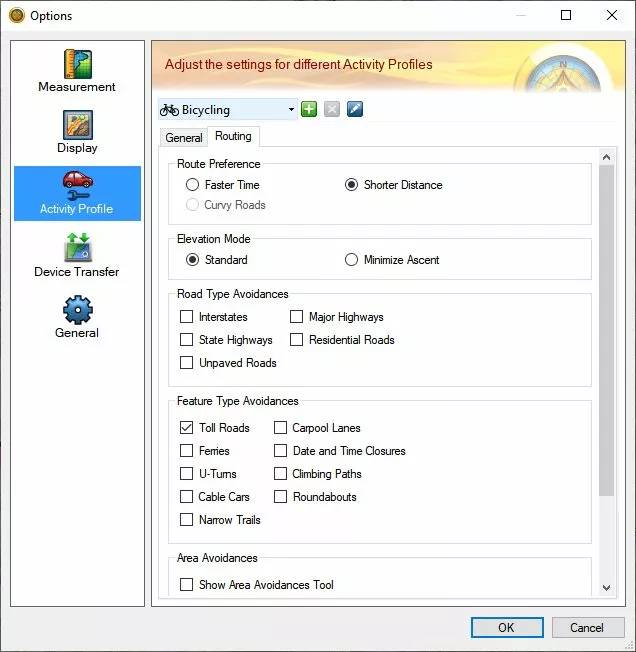
Then there are several Bicycling, Mountainbiking, Tour Cycling options. With the VeloMap - if you configure the avoidances the same, they all route alike. They are now the best option for longer distance routing.
ATV and Dirt Biking Route pretty similar - Dirt Biking gives the best routes and can route over shorter distances (<=10km by air without any intermediary routing points). IUt usually fails on longer distances. Also Dirt Biking is not available on most GPS devices - while ATV is.
Hiking, Walking, Mountaineering also all behave alike --> The results are okay for short distances with the Velomap - over long distances however it seems to use the worst streets/ways for cycling (mainly primary and secondary roads).
Motocar/Motorcycle
not suitable for longer distances. Very short distances route pretty well. In general ATV or dirt biking are better however.
I'm not sure where and how to classify Nuvi and Zumo devices - it will depend on age.
Faster Time vs Shorter Distance
With my maps shorter distance already tries to route over nice ways. If you use "faster time" - especially in combination with car/motorcycle or Automotive mode, then an even higher preference for "nice" ways will be used and routes tend to be longer (more detours) overall. With my maps there is no such routing as really shortest distance (it is actually impossible to do really have autorouting on Garmin GPS find the shortest route over long distances). If you use shorter distance the route will be in general straighter and with less detours - also longer overall distances will be calculated without crashing (error notice, no actual crash).
Estimated Arrival time
Garmin is not supporting proper Arrival times for Cycling. Using bicycle the estimated arrival times using "faster time" are simply calculated by averaging 18km/h - hence not very useful. Using "shorter distance" the arrival time often becomes really bogus. Using Automotive, Car/Motorcycle or other modes, the times will be far too short. Also elevation (so climbs or downhills) are not taken into the calculation. This is the same for Garmins own maps.
Road Type Avoidances
NEVER Tick "Avoid Highways" - It will block the best ways. On my maps, shared use pathes and cycleways are encoded for the GPS as highways. Real highways or big streets where cycling is not allowed are not routable anyhow with the Velomaps (so no need to avoid them).
Interstates: I have put cycleroutes high priority into my maps. If you tick "avoid Interstates" then this high preference is largely reduced. Never tick it if you you like cycleroutes and don't mind the occasional detour it takes to stay on a cycleroutes. If you are however a roadbiker, and your main aim is to cycle fast and improve your fitness, then you can tick this box, and you'll be mainly routed over unclassifed and tertiary streets.
Major Highways: If you tick it you will avoid streets that are nice for cycling, cycleways, cyclepaths, and so on. Well as you want to cycle with this map, I don't think you ever want to tick that box.
State Highways: Don't tick it. Most ways in the Velomap would be blocked.
Residential Roads: If you tick it, then actual highways where cycling is allowed, are avoided (primary and secondary streets that have no cycleways), as well as actual residential roads. For roadbiking this might make sense. For recreational cycling, don't tick it.
Unpaved roads: Does what it says and avoids unpaved roads. However also avoids ways that are not good enough quality for a racing bicycle with slick tires (sometimes this fails because of missing/wrong OSM data or tags). Also avoid ways, where cycling is forbidden, but thought to be still possible. (e.g. a primary road, where cycling is forbidden).
Feature Type Avoidances:
Toll roads Avoids ways not suitable for a trekking bicycle. Note really difficulty ways like via ferratas, difficult alpine ways, or difficult mtb trails are not routable anyhow. In General this avoids ways with tracktype 5 or above, or mtb:scale>0 or sac_scale mountain_hiking or above. Note that the ways avoided, are of very low priority, so usually never taken.
Avoid Ferries - Avoids ferries, cablecars, gondolas and mixed lifts.
U-Turns avoids any turn over 120° - best not use, because it will destroy sensible autorouting.
Cable Cars: Does not matter with Velomaps (or better, does not work, best don't tick anyhow).
Narrow Trails: Does not matter with Velomaps.
Carpool lanes: Avoids all ways where cycling is forbidden (and no more).
Date and Time Closures - it is currently not possible with mkgmap to produce maps that react to this setting.
Climbing Paths: Does not matter with Velomaps.
Roundabouts: Well does exactly what it says. I advice you to never tick this box, else roundabouts are avoided, and then routing likely won't work well.
General Tips and Advices - e.g. Route Calculation Fails
If Routing fails and you need to get somewhere without being able to set via points, you can try with “shorter distance” calculation which should autoroute even through heavily mapped cities (actually the better a region is mapped, without sufficient bicycle/mtb routes the more difficult it is for the routing engine to get over longer distances, Enabling “shorter distance” instead of “Faster Time” gets you to your destination quite well (though then also big streets are chosen quite often). Due to the way the maps are setup, setting your GPS to “shorter distance” should generate routes that are much quicker. “Faster Time” calculates nicer routes, but will take much more time. It it fails with "out of memory" error, you can also change the route calculation method. Another possibility to to deactivate "avoid unpaved roads". Often some very small patches of unpaved roads will hinder the routing to work well. Then just try to cycle a bit nearer using the route, and after a few kilometers (or better say 20 turns) click on recalculate after reactivating avoid unpaved roads.
Attention - Same Map.
You need to plan the routes with the identical map in Basecamp (same country, same date (that is paramount) that you use on your GPS device. Unicode/Non Unicode does not matter however. If you created the route with an older map - recalculate it in Basecamp first - then send it again to your GPS device. Also if you update maps on your device - it will often lead to errors if you try to use an older route (does not have to - but the more months between the map used for planning, and the map used with the route on your device - the more likely you get route calculation errors). To correct this - recalculate the routes in Basecamp with the new map - and send them again to your device. If the route now does not work in Basecamp anymore - its quick to notice. Maybe you will need to move some via points.
Routing does not work over long distances:
There are two main causes for bad routing: 1. non connected streets in OSM. 2. Not enough streets suitable for cycling - or tracks and pathes that are not tagged with tracktype/smoothness so that they are blocked when using "avoid unpaved roads". You should be able to route for 15km minimum to about 70-80km maximum without needing to route over via points on old GPS. Using Mapsource or newer GPS like Oregon or Dakota you can route over much longer distances. Very very long routes will never work because the routing engine of Garmin is not strong enough (and maybe there are still some improvements to be made in mkgmap). This is because Garmin algorithm likes to go straight for long time (like on a motorway) - routes suitable for cycling or mountainbiking make turns, have many intersections and are not so easy to be routed on. Because I don't want the maps to send you onto big roads, routing will not work over long distances. For autorouting inside your car there are better maps available. Maps offered here are supposed to give you the best routing possible on Garmin GPS for mountainbiking / hiking or cycling. Solution: Insert additional via-points.
How to overcome problems when routing over long distances:
Routing without via points over large distances (i.e. 50-100km) will often not work, even though by setting via points you will find a way. The better the OSM Coverage the greater the distance you can cover with the autoroute function. For in car use I recommend either Garmin City Navigator maps if you have the doll to shell out, or the excellent Autoroutable maps by Lambertus: http://garmin.na1400.info/routable.php The maps offered here are to be used for cycling, commuting via bicycle and roadbiking. I have structured the Routing Preferences so that small streets are preferred over larger streets. If you want to plan you're routes in Mapsource and be sure that recalculation works on GPS I recommend you to read through here: plan-routes-efficiently following this tutorial and using wingdb you can easily create routes via pc that go over 200-300km. I advise however to make a new route for each day.


Hallo Felix,
seit einiger Zeit bemerke ich in Basecamp+Velomap, dass Routing über als “Pdstrn” (Fußgänger) gekennzeichnete Wege strikt vermieden wird. Nun ist es oft so, dass dort gleichzeitig ausgewiesene Fahrradrouten langführen. Das ergibt zusammen keinen Sinn. Man kann mit zusätzlichen Wegepunkten die Strecke erwingen, aber in einigen Fällen musste ich sehr viele Punkte setzen.
Viele Grüße, Peter
Welcher Modus? Seit dem letzten Update hat Basecamp leider wieder einiges verschlechtert am routing kommt mir vor.vor allem wenn Fußgänger/wandern usw als Modus ausgewählt ist.
Basecamp 4.7.4 von Mai 2021: Tourradfahren – kürzere Strecke – Vermeidung von Straßentypen und Merkmalen nichts angehakt
M.E. ist dass auch erst später aufgetreten – dann kann es eigentlich nur eine Änderung in Velomap sein, oder?
Ich habe es auch mal mit dem guten alten Mapsource probiert: genau der gleiche Effekt.
Hmm, sehr komisch – kannst du mir mal einen OSM Permalink zu so einem Stück antworten. Eigentlich dürfte das nicht sein (außer es hat Fahrradverbot mit xbk pdstrn bezeichnet)
Meine “Lieblingstelle”:
https://www.openstreetmap.org/?mlat=53.32656&mlon=11.48758#map=17/53.32656/11.48758&layers=C
https://www.openstreetmap.org/?mlat=53.33351&mlon=11.48514#map=17/53.33351/11.48514&layers=C
Die Hofdamenallee im Schlosspark Ludwigslust. Da führen der Mecklenburgische Seenradweg und der Residenzstädte-Radweg lang.
Viele Grüße, Peter
Soweit ich sehe, ist der Weg als “pdstrn”, aber nicht als “xbk pdstrn” gekennzeichnet.
Super vielen Dank – ich habe den Fehler gefunden. Ich habe nicht überprüft ob highway=pedestrian Teil einer Fahrradroute oder MTB Route ist beim setzen der Tags zum verbieten der Nutzung des Weges. Ich update grad alle Karten neu – wird in 24-36h für die Deutschlandkarte (Version 27.11 oder 28.11) aktualisiert sein. Ich denke es macht Sinn die sonst per default in der VeloMap auszunehmen – da in Deutschland pedestrian wenn kein bicycle Tag vorhanden ist laut Tagging Richtlinien verboten ist für Fahrrad (im Prinzip ist es hier also ein Tagging Fehler – das dort eine Fahrrad route entlang geht, kann ja auch bedeuten absteigen nötig. Ein bicycle=yes wäre angebracht (ich halte mich hier in der VeloMap an die Richtlinien je nach Land laut OSM Wiki – und für Deutshcland ist per default eben verboten=absteigen.
Vielen Dank, das klappt jetzt. Ich gebe Dir recht, dass das Tagging auf solchen Stecken geändert werden müsste. Denn ich habe real noch nie ein längeres Stück gesehen, wo ein Radweg lang ging und ich hätte schieben müssen.
Ich habe aber im Zuge dessen bzw auch schon vorher ein Problem beim Routing in Basecamp gefunden – und das Routing diesbezügich etwas angepasst. Aber das betraf nicht pdstrn mit Fahrradrouten oder MTB Routen (sehr wohl aber ohne – allerdings auch nur im Modus Fußgänger/wandern)
ö
Hi Felix, I’ve been using your maps in Berlin for a few days now. And while I like the looks, I’m not too thrilled about the routing.
I think this is related to your general preference for small streets. While for many use cases that makes perfect sense, for functional commuting (getting from A to B fast without getting hit by a car) in a big city like Berlin, this is not optimal.
In many cases a big city street (with two lanes each way and a cycling-lane painted on the street) is faster and safer than a small street (with one lane and no cycling strip, or one on the sidewalk that is in terrible shape) where car drivers are often very aggressive because they can’t pass you easily and think you should ride on the non-functional sidewalk strip. I think many of us know the scenario…
So my question is, would it be possible to have a configuration profile for this sort of commuting? Priority to fast big roads, scenic views unimportant? (By comparison, I’ve tried the BBBike map, and while not perfect, at least it doesn’t actively try to chase me off a big street at every opportunity).
Of course general routing can never be perfect. But I think there are different functional ways of riding a bicycle. They are all legitimate, but they would need different routing protocols.
It is really hard to get nice routing outside of cities while also getting decent routing in cities – even more as it’s completely random if big streets are a good optio nor not. Sometimes they are – sometimes not at all – yes I likely 50% of the time in big cities also use big streets – as they have better green light phases over small streets. And yes I try to avoid steets which have a cylceway=track while favouring cycleway=lane. That only works if people tag this correctly. Additionally the key class:bicycle may be useful which I also look at. A big problem then of course is trying to get this into the garmin algorythm which acts more and more random (10 years ago this was much better – before they tried to change the algo to create usable bicycle routing with their old maps not made for bicycles…). Most of the blame here is on Garmin actually which made it next to impossible to get proper routing for bicycles.
Hi Felix, I have a Mid Generation GPS – the Oregon 600. You mention above to use Basecamp v3.3 to v4.5. Dakota, Oregon 600/650, Montana, etc.
But only the new basecamp 4.7.3 is available for download.
Will that still work with the Oregon?
Any special instructions? Thank you.
sorry if you misunderstood – just use the new Basecamp. The only thing is that the autorouting in the older Basecamp versions was more similar to how it will work on the 600. No worries using the newest Basecamp version – just when rerouting on device the differences may be a bit bigger.
Thank you, that’s perfect
I have a query on how turn by turn directions (on a Garmin Edge 530) work with regard to roundabouts. I’ve had a play and it seems that to take a right turn on a round about here in the uk (would be the 3rd exit), my turn by turn instructions tell me to take a left turn, then a right turn and then another left turn – ie instead of telling me to take the 3rd exit, its navigating me round the roundabout itself. Is there anyway to change this behaviour? The standard Garmin maps seem to at least acknowledge the existence of roundabouts rather than try to treat each part of the roundabout as a separate turn. Cheers.
it shouldn’t happen that way. Is it on the Europe map or UK map? In the Europe map it’s not avoidable. but in the UK map it should be fine.
Hi. Im using the Great Britain map, on an edge 530 with latest firmware. I’ve just removed and reinstalled the Velomap, and made sure all other maps are disabled on the device (apart from the Garmin INTL Basemap). It seems to happen with route calculation on the device itself, or via saved courses (imported from Komoot). I’ve also tried routing (bicycle mode) via Garmin basecamp, with the edge 530 attached and using the Velomap – its the same, it doesn’t recognise the roundabout, but does with Garmin maps for the same route
Is there anything I could send to assists with this?
yep it doesn’t recognise roundabouts – I disabled that because of a bug – but actually it was a bit unrelated. From next map update onwards I will re-enable roundabout specific routing.
Ok great stuff, thanks for the update, much appreciated!
I can see this has been updated already, and is now working perfectly! Thanks for sorting it.
Hallo Felix, ich habe ein Problem mit dem Autorouting: Velomap-Karte vom 02.07.20, Route geplant mit BaseCamp 4.7.2, im Wesentlichen auf eingezeichneten Fernradwegen, 60 km, 25 Zwischenziele. Unser Oregon 600 routet problemlos, unser Oregon 700 verliert alle paar km die Route. Er will dann umkehren zum letzten oder vorletzten Zwischenziel. Manchmal fängt er sich wieder beim Erreichen des nächsten Zwischenziels, sonst manchmal beim erneuten Start der Route. Dabei zeigt er dann statt der Route lange parallele Geraden zu den Zwischenzielen. Das Routing ist so völlig unbrauchbar. Die Oregons haben die aktuelle Firmware und sind mit einer fertigen Deutschland Karte als img bestückt. Kannst du mir helfen?
Gruß Axel
Sehr komisch – ich hab leider kein 700er zum überprüfen. Kannst du mal stattdessen die Länderkarte am 700er probieren – also ein ganz aktuelle? Die Routing Einstellungen sind identisch?
Hallo Felix,
Ich habe sämtliche Kombination der Routing – Optionen ausprobiert. Die Länderkarte kann ich nicht probieren, da ich unterwegs bin und kein Notebook auf dem Fahrrad habe. Ich habe das Verhalten schon vorher bemerkt, aber es damit begründet, dass ich Kreisrouten mit identischem Start und Ziel gefahren bin. Damals habe ich eine Länderkarte benutzt.
Hallo Felix, ich habe jetzt die img-Datei vom 10.07. installiert. Keine Verbesserung. Der Oregon 700 unterscheidet sich in den Konfiguration-Möglichkeiten erheblich vom 600 und auch im Verhalten. Er neigt dazu, die Zwischenziele zu ignorieren oder daran zu scheitern. Am besten funktioniert Off-Road, dann werden allergings die Zwischenziele ignoriert. Gibt es denn niemanden, der die gleichen Probleme mit einem 700er hat? Vielleicht solltest Du mal einen 700er testen?
Ich werde mal versuchen an ein 700er zu kommen.
Hallo Felix, noch eine Rückmeldung nach 1200 km: das oben geschilderte Verhalten habe ich auf dem Radweg HH Rügen beobachtet. Auf dem Oder-Neiße-Radweg funktionierte das Routing recht gut, allerdings ist dort das Wegenetz wohl auch weniger komplex. Auffällig war allerdings , dass der 700 oft im Detail andere routen vorschlug als der 600, der sehr konform zu Basecamp routet. Das Verhalten des 700 konnte ich durch die Einstellungen nicht beeinflussen.
Hallo Felix,
leider habe ich im vergangenen Jahr keine Rückmeldung mehr von Dir bekommen.
Da der Fahrradurlaub in Kürze ansteht, habe ich meine Oregon 600 und 700 (jeweils mit aktueller Firmware) mit der aktuellen Germany.img vom 19.06.2021 bestückt. Eine Probetour mit dem Oregon 700 ergab, dass die Routingprobleme aus dem letzten Jahr noch größer geworden sind, ein Autorouting ist nicht mehr möglich. Regelmäßig will das Gerät zum letzten passierten Zwischenziel zurückrouten. Ein Routing auf dem Oregon 600 (was im letzten Jahr bis auf wenige Ausnahmen noch funktionierte) ist nicht mehr möglich. Das Gerät bricht nach “LOS” das Routing ab. Teilweise haben beide Geräte die Meldung gegeben, dass über 50 Zwischenziele nicht geroutet werden können, obwohl die nicht der Fall war. Kurze Routen – ca. 20 km – mit etwa 15 bis 20 Zwischenziele funktionieren nicht mehr. Diese Routen konnte ich im letzten Jahr mit den älteren Karten problemlos verwenden. Ich habe die Garmins mit den von Dir empfohlenen Routing-Einstellungen versehen und auch weitere Kombinationen erfolglos ausprobiert.
Mein Fazit nach mehreren Stunden Aufwand: Deine Karte vom 19.06.2021 ist für Autorouting-Zwecke auf Garmin Oregon 600 und 700 nicht einsetzbar.
Ein Quercheck mit OpenTopoMap-Karten ergab, dass diese auf beiden Geräten schnell und problemlos routen, allerdings mit wenigen Abweichungen.
Ich hätte gern von Dir eine Rückmeldung, ob Du mir für das von mir gewünschte Autorouting Velomapkarten bis Mitte Juli bereitstellen kannst oder ob ich auf ein anderen Kartenprodukt wechseln muss. Ich würde dies bedauern, da ich bislang mit dem Layout der Karten und dem von Dir geleisteten Support zufrieden war.
Gruß Axel
Bist du sicher dass du keine Vermeidungen aktiviert hast? Ich habe am 600er keine Probleme. Ein 700er habe ich noch nicht – ich habe ab nächster Woche noch eine Fenix 6x Pro zum überprüfen (da die nur 64 Farben darstellen kann – habe ich eine bestellt um dafür ein Layout zu kreieren – da es derzeit problematisch ist).
Außer dir hat niemand solche Probleme gemeldet. 49 Zwischenziele auf einer Route könnten ein Limit sein – also nicht mehr als 49 Zwischenziele.
Die Routen hast du in Basecamp erstellt und dann auf das Gerät übertragen? Die Karte mit der du die Routen erstellst ist identisch zu der auf dem 600er und 700er (das ist sehr wichtig). Alle anderen Karten sind deaktiviert (bzw entferne sie sogar mal temporär durch umbennenen der Dateiendung etwa zu .img.bak.
Gerade Bundestraßen und Autobahnen vermeiden etwa führt dazu dass das Routing nicht nutzbar ist.
Nachdem ich gestern Abend noch einen Warnhinweis auf die unterschiedlichen Kartenversionen gefunden hatte, habe ich die .img-Datei vom 19.06. durch die Deutschlandkarte vom 14.05.21, die ich in Basecamp nutze, auf den Handgeräten ersetzt (per Garmin Mapinstall). Nun sind die Karten identisch und die auf dieser Kartenversion in Basecamp erstellte Routen funktionieren auf den Handgeräten tadellos! Das Routing ist in wenigen Sekunden berechnet, ich bin heute erfolgreich eine Kreistour mit 40 km und 41 Zwischenzielen gefahren. Auch das Einspringen mitten in der Tour geht reibungslos. Aber: Alte Routen (ich habe über 500 Routen) müssen mit einer neuen Karte neu berechnet werden, sonst gibt es die genannten Probleme auf dem Handgerät. Ich denke, Du solltest den Hinweis zu den Kartenversionen deutlich prominenter platzieren, da insbes. die .img-Datein sonst ein Stolperstein sind. Auch kann man mal vergessen, ein Kartenupdate im PC auf den Handgeräten nachzuziehen.
Da wir auf den Fahrradurlauben Wandertage einlegen, die ich mit der Openmtbmap plane: Gibt es etwas zu beachten, wenn beide Karten auf dem Handgeräte in zwei .img-Dateien vorhanden sind? Kann es durch die Verwendung der Höhenmodelldateien zu Problemen kommen?
Das sollte doch logisch sein. Das Problem muss nicht immer auftreten – aber wenn eine Straße etwa verschoben ist – oder nicht mehr existiert – dann ist die Route futsch. Genauso wenn ich etwas am style-file – also der Erstellung bezüglich des Routings ändere. Das betrifft alle Karten, also nicht nur meine sondern auch jede andere Karte basierend auf OSM, oder Garmins eigene Karten.
WAs meinst du mit beide Karten – wichtig ist nur keine Karte doppelt. Höhenlinien sind als gmapsupp.img separate Karte – in dem Fall dürfen die Höhenlinien halt nicht auch nochmal mit der Karte an sich gesendet worden sein (etwa mit MapInstall).
Aber ich habe jetzt hier nochmals einen Absatz diesbezüglich eingefügt.